

How to Handle Difficult Questions During Financial Services Webinars
You've spent weeks preparing for your webinar. The presentation has been reviewed, your speakers are ready and you've finally made it to the live Q&A.
Then someone asks a question nobody was expecting.
Perhaps it's about disappointing investment performance, a change in fees or a client's individual circumstances. Your presenter might know the answer, but are they actually in a position to give it?
For Financial Services organisations, managing audience questions can require a little more thought than it would for a typical webinar. And while you can't predict everything your audience might ask, you can certainly prepare for how you'll handle it.
We've put together some practical advice to help you manage Q&A sessions, support your presenters and make sure your audience gets the information they need.
1. Decide what your presenters can and can't answer
Before your webinar, spend some time discussing the types of questions you're likely to receive.
This is particularly important if you're hosting an investor update, client briefing or financial education session where the information being discussed may be sensitive or subject to internal approval.
Think about the difference between these three questions:
"What contributed to the fund's performance this quarter?"
Your presenter may be able to answer this using information that's already been reviewed and approved.
"Can you explain why a particular transaction wasn't included in the figures?"
This might require further investigation before anyone can give an accurate answer.
"Based on today's presentation, should I change my investments?"
This is a very different type of question. It relates to an individual's circumstances and may need to be handled separately through your organisation's authorised advice or client service channels.
The important thing is making sure your presenters understand these distinctions before they're put on the spot.
You don't need to prepare an answer to every possible question. Instead, agree which subjects can be discussed during the webinar and when a question should be referred elsewhere.
WorkCast Top Tip: Put together a short list of subjects that need additional review and share it with your presenters and moderator before the event. Keep it somewhere they can easily refer to during the broadcast.
2. Have someone manage the questions behind the scenes
We'd always recommend having a dedicated moderator for a live webinar Q&A, particularly when you're expecting a large audience.
Your presenter has enough to think about without having to read incoming questions, decide which ones are appropriate and work out what to answer next.
A moderator can review questions as they arrive, group similar ones together and pass suitable questions to the presenter.
For Financial Services webinars, it's also worth agreeing who the moderator should contact if something needs checking.
For example:
- Presenter or subject expert: Answers questions about the approved webinar content.
- Moderator: Reviews incoming questions, manages the queue and keeps the session moving.
- Compliance or relevant internal reviewer: Advises on questions that fall outside the agreed scope, where required by your organisation's procedures.
- Client services team: Handles account-specific enquiries that shouldn't be discussed in a public webinar.
One person may cover more than one responsibility, depending on the size of your event.
The important thing is that everyone knows what they're responsible for.
And make sure you agree how the moderator will communicate with the presenters. You don't want someone interrupting the broadcast to ask whether a question is suitable!
3. Give attendees the opportunity to submit questions beforehand
Here's a simple tip that can make a huge difference to your preparation.
Ask attendees whether they have any questions when they register for your webinar.
Not everyone will submit one, but the responses you receive can be incredibly useful.
Imagine you're planning a quarterly investor update. Several registrants ask about the same change in performance.
Rather than waiting for the Q&A, you could include a clearer explanation in the presentation itself.
It also gives your speakers time to check figures, prepare responses and refer anything that needs additional review to the appropriate team.
Of course, you can still accept questions during the live webinar. Collecting them in advance simply gives you a head start.
WorkCast Top Tip: Keep a few approved questions ready in case your audience is quiet at the beginning of the Q&A. It's a good way to get the conversation started without putting pressure on attendees to ask the first question.
4. Prepare your presenters for questions they can't answer
Nobody knows everything. Even the most experienced presenter can receive a question that requires additional information.
And that's fine!
What matters is how they respond.
If someone asks about a figure that hasn't been verified, or a subject that wasn't covered in the approved presentation, your speaker shouldn't feel pressured to provide an immediate answer.
Instead, give them a few phrases they're comfortable using.
For example:
"That's a good question. We'd like to check the details before giving you an answer, so we'll arrange for the appropriate team to follow up."
Or, if the question relates to personal circumstances:
"That's something we'd need to discuss with you individually rather than during today's webinar. We'll explain the appropriate way to get in touch."
These are examples rather than approved scripts, so make sure the wording works with your organisation's communication policies.
The key is to acknowledge the question, explain what happens next and avoid making promises your team can't fulfil.
It's also worth practising this during your webinar rehearsal. Have someone ask a question that falls outside the agreed topics and let your moderator and presenter work through what they'd do.
Much better to have that conversation during a rehearsal than for the first time in front of your audience.
5. Don't leave unanswered questions sitting in the queue
You've reached the end of your webinar, thanked your speakers and closed the broadcast.
But what happens to the questions you didn't get around to answering?
It's easy to focus on sending the recording and forget that some attendees are still waiting for information.
Before your event, agree how you'll manage those outstanding questions.
A simple system might look like this:
| Question | What to do next |
|---|---|
| General question you ran out of time for | Include an approved answer in your follow-up email or FAQ |
| Question requiring more detailed information | Assign it to the relevant subject expert |
| Question needing internal approval | Follow your organisation's review process before responding |
| Personal or account-specific enquiry | Direct it to the appropriate secure communication channel |
| Question asked by several attendees | Consider creating a separate resource or future webinar |
We'd also recommend keeping a record of who is responsible for each follow-up, along with its status.
You don't need a complicated system. Even a simple internal tracker can help make sure nothing gets missed.
Just be mindful of how you're handling personal information and whether your organisation has specific requirements for retaining webinar questions and responses.
6. Pay attention to what your audience is asking
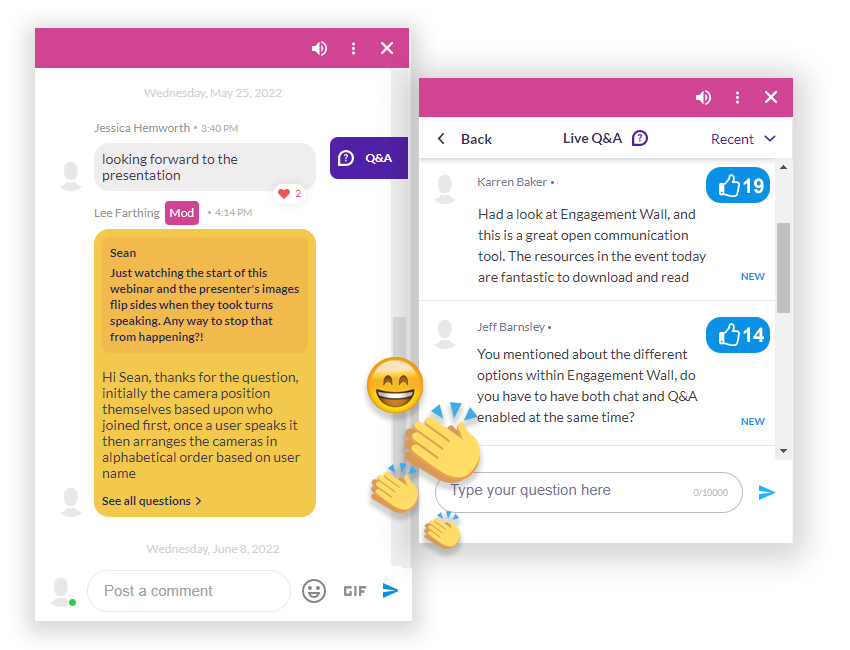
Your webinar questions can tell you a lot about how well your content has been understood.
For example, if five attendees ask for clarification on the same performance figure, there's a good chance that part of your presentation needed a little more explanation.
Or perhaps several people ask about a subject you only briefly mentioned.
That could be a great starting point for your next webinar.
After the event, spend a little time reviewing the questions with your team.
Look for recurring themes, areas of confusion and subjects your audience wants to know more about.
You might find that a short follow-up article, an additional resource or another educational session would be genuinely useful.
And that's much more valuable than simply counting how many questions were submitted.
Your pre-webinar Q&A checklist
Before your next Financial Services webinar, make sure you've covered the basics:
- Have you agreed which topics presenters can answer?
- Do you know which questions need additional review?
- Is someone responsible for moderating the Q&A?
- Does the moderator know who to contact if something needs checking?
- Have you collected questions from attendees beforehand?
- Have you prepared a few approved questions to get the discussion started?
- Have your presenters practised handling questions they can't answer?
- Do you have a process for following up on unanswered questions?
A little preparation here can make a big difference when your event goes live.
Make your Q&A worth attending
A good webinar Q&A isn't about answering every question as quickly as possible.
It's about giving your audience accurate, useful information and making sure they know what to expect when something can't be answered immediately.
For Financial Services teams, that means having the right people involved, preparing presenters properly and making time for follow-up.
At WorkCast, we help organisations deliver live webinars and webcasts with audience Q&A and moderator controls, whether they're managing events themselves or working with our experienced event delivery team.
If you're planning webinars for clients, investors or internal teams, we'd be happy to help you work out the best approach.
.png?width=2380&height=2380&name=%E2%80%9CClick%20here%E2%80%9D%20to%20view%20our%20open%20uni%20handbook%20(1).png)